Clean node_modules Locally — Why I Didn't Build a Web App
Two Python scripts to safely clean gigabytes of node_modules folders from your projects. Learn why local-first beats web-based file processing.

The Problem Every Developer Knows
You're backing up your projects folder. The progress bar crawls. 30 minutes later, you're still waiting. Why? Because each of your 20 projects has a node_modules folder averaging 300MB.
That's 6GB of dependencies you could regenerate with a single npm install command.
I built a solution — but here's why I decided NOT to turn it into a web app.
Table of Contents
- Why Not a Web App?
- The Better Solution: Local Scripts
- Requirements
- Let's start
- Script 1: Clean ZIP Files
- Script 2: Clean Directories
- Real-World Use Cases
- Performance Comparison
- Tips & Best Practices
- Troubleshooting
- FAQ
- Why This Approach Wins
- License
- Final thoughts
Why Not a Web App?
My first instinct was classic developer thinking: "Let's make this a Flask web app! Users can upload zips, and we'll send back cleaned versions."
Then I thought about what could go wrong. A lot.
Security Risk #1: Zip Bombs
A malicious user uploads innocent.zip — only 5MB. Your server extracts it. Suddenly you're extracting 500GB of data.
innocent.zip (5MB)
  └── layer1.zip (50MB extracted)
      └── layer2.zip (500MB extracted)
          └── layer3.zip (5GB extracted)
              └── layer4.zip (50GB extracted)
                  └── massive_file.txt (500GB!)
Result: Your server's hard drive fills up instantly. Everything crashes.
Web-based fix: Check uncompressed size before extracting. Add file size limits. Monitor extraction progress. Implement timeouts.
Local script fix: Not your problem. It's the user's disk space.
Security Risk #2: Path Traversal
ZIP files can contain filenames like ../../etc/passwd or ../../../../root/.ssh/id_rsa.
Without proper validation, extracting these could:
- Overwrite system files
- Expose sensitive data
- Compromise the entire server
Web-based fix: Validate every extracted path. Ensure it stays within the temporary directory. Use security libraries.
Local script fix: User's own machine. They have the same permissions they always have.
Security Risk #3: Resource Exhaustion
Processing ZIP files is CPU-intensive. What happens when:
- 100 users click "CLEAN" simultaneously?
- Each extraction spawns multiple threads?
- Server CPU hits 100%?
Result: Classic Denial of Service (DoS). Your server freezes. Nobody can use the service.
Web-based fix: Implement job queues (Celery/Redis). Rate limiting. User authentication. Background workers. Load balancing.
Local script fix: One user, one machine. No queuing needed.
Security Risk #4: Cleanup Nightmares
temp_dir = tempfile.mkdtemp()
# Extract files...
# Process files...
# Server crashes here 💥
# temp_dir never gets deleted
Crashed processes leave temporary directories on disk. After a few weeks of production traffic, you have hundreds of abandoned folders consuming disk space.
Web-based fix: Implement try/finally blocks. Add cleanup jobs. Monitor disk usage. Set up cron jobs for orphaned files.
Local script fix: Python's tempfile.TemporaryDirectory() handles cleanup automatically.
The Better Solution: Local Scripts
Instead of building infrastructure to handle security risks, rate limiting, authentication, and monitoring — I created two simple Python scripts you run on your own machine.
Benefits of Local-First:
| Web App | Local Script |
|---|---|
| ❌ 50MB upload limit | ✅ No size limits |
| ❌ Needs authentication | ✅ Direct access |
| ❌ Queue waiting time | ✅ Instant processing |
| ❌ Your code on our servers | ✅ Complete privacy |
| ❌ $50/month hosting | ✅ Free forever |
| ❌ Security vulnerabilities | ✅ Zero web attack surface |
Requirements
- Python 3.6 or higher
- No external dependencies (uses only standard library)
- Works on Linux, macOS, and Windows
Let's start
Download
Option 1: Download individual scripts
# Download both scripts
curl -O https://raw.githubusercontent.com/NikolaPopovic71/node-modules-cleaner/main/clean_node_modules.py
curl -O https://raw.githubusercontent.com/NikolaPopovic71/node-modules-cleaner/main/clean_directory.py
Option 2: Clone the repository
git clone https://github.com/NikolaPopovic71/node-modules-cleaner.git
cd node-modules-cleaner
Option 3: Download ZIP
Download the repository as a ZIP file from the green "Code" button above.
OPTION 4. follow me:
Please copy the complete scripts directly from this article — they're both provided in full below!
Note: Scripts are Python's files - for example:
name_of_file.py(.pyis Python's files extension)
On my D: disc where I already have folder Node I created new folder cleaning_node_files
(of course you will choose your own, local folders with names you already gave them)
Then I opened VSCode and inside the folder cleaning_node_files I created first Python's script (or file)
clean_node_modules.py (please copy and paste - the file is below)
Script 1: Clean ZIP Files
Perfect for cleaning project backups before storing or sharing them.
The Script clean_node_modules.py
#!/usr/bin/env python3
"""
Clean node_modules folders from a zip archive.
Extracts the zip, removes all node_modules directories, and creates a new cleaned zip.
"""
import zipfile
import shutil
import tempfile
from pathlib import Path
import argparse

def remove_node_modules(directory):
    """
    Recursively find and remove all node_modules folders.
    Returns the number of folders removed and space freed.
    """
    removed_count = 0
    total_size = 0

    directory_path = Path(directory)

    # Find all node_modules directories
    for node_modules_path in directory_path.rglob('node_modules'):
        if node_modules_path.is_dir():
            # Calculate size before deletion
            folder_size = sum(f.stat().st_size for f in node_modules_path.rglob('*') if f.is_file())
            total_size += folder_size

            print(f"Removing: {node_modules_path} ({folder_size / (1024*1024):.2f} MB)")
            shutil.rmtree(node_modules_path)
            removed_count += 1

    return removed_count, total_size

def clean_zip(input_zip_path, output_zip_path=None):
    """
    Clean node_modules from a zip file.

    Args:
        input_zip_path: Path to the input zip file
        output_zip_path: Path for the output cleaned zip (optional)
    """
    input_zip = Path(input_zip_path)

    if not input_zip.exists():
        raise FileNotFoundError(f"Input zip file not found: {input_zip_path}")

    # If no output path specified, create one with _cleaned suffix
    if output_zip_path is None:
        output_zip_path = input_zip.parent / f"{input_zip.stem}_cleaned.zip"

    print(f"Input zip: {input_zip_path}")
    print(f"Output zip: {output_zip_path}")
    print(f"Original size: {input_zip.stat().st_size / (1024*1024):.2f} MB\n")

    # Create a temporary directory for extraction
    with tempfile.TemporaryDirectory() as temp_dir:
        print("Extracting zip file...")
        with zipfile.ZipFile(input_zip_path, 'r') as zip_ref:
            zip_ref.extractall(temp_dir)

        print("Extraction complete.\n")

        # Remove node_modules folders
        print("Searching for node_modules folders...")
        removed_count, total_size = remove_node_modules(temp_dir)

        print(f"\nRemoved {removed_count} node_modules folder(s)")
        print(f"Space freed: {total_size / (1024*1024):.2f} MB\n")

        # Create new zip without node_modules
        print("Creating cleaned zip file...")
        with zipfile.ZipFile(output_zip_path, 'w', zipfile.ZIP_DEFLATED) as zip_out:
            temp_path = Path(temp_dir)
            for file_path in temp_path.rglob('*'):
                if file_path.is_file():
                    arcname = file_path.relative_to(temp_dir)
                    zip_out.write(file_path, arcname)

        output_size = Path(output_zip_path).stat().st_size
        print(f"Cleaned zip created: {output_zip_path}")
        print(f"New size: {output_size / (1024*1024):.2f} MB")
        print(f"Size reduction: {(input_zip.stat().st_size - output_size) / (1024*1024):.2f} MB")

def main():
    parser = argparse.ArgumentParser(
        description='Clean node_modules folders from a zip archive',
        formatter_class=argparse.RawDescriptionHelpFormatter,
        epilog="""
Examples:
  %(prog)s projects.zip
  %(prog)s projects.zip -o clean_projects.zip
        """
    )

    parser.add_argument('input_zip', help='Path to the input zip file')
    parser.add_argument('-o', '--output', help='Path for the output cleaned zip (default: input_cleaned.zip)')

    args = parser.parse_args()

    try:
        clean_zip(args.input_zip, args.output)
        print("\n✓ Cleaning completed successfully!")
    except Exception as e:
        print(f"\n✗ Error: {e}")
        return 1

    return 0

if __name__ == "__main__":
    exit(main())
Usage Examples
Basic usage — automatic output naming
In my folder REACT located "D:\NextJS\REACT" which content several React's projects (folders) and each of them
has a node modules
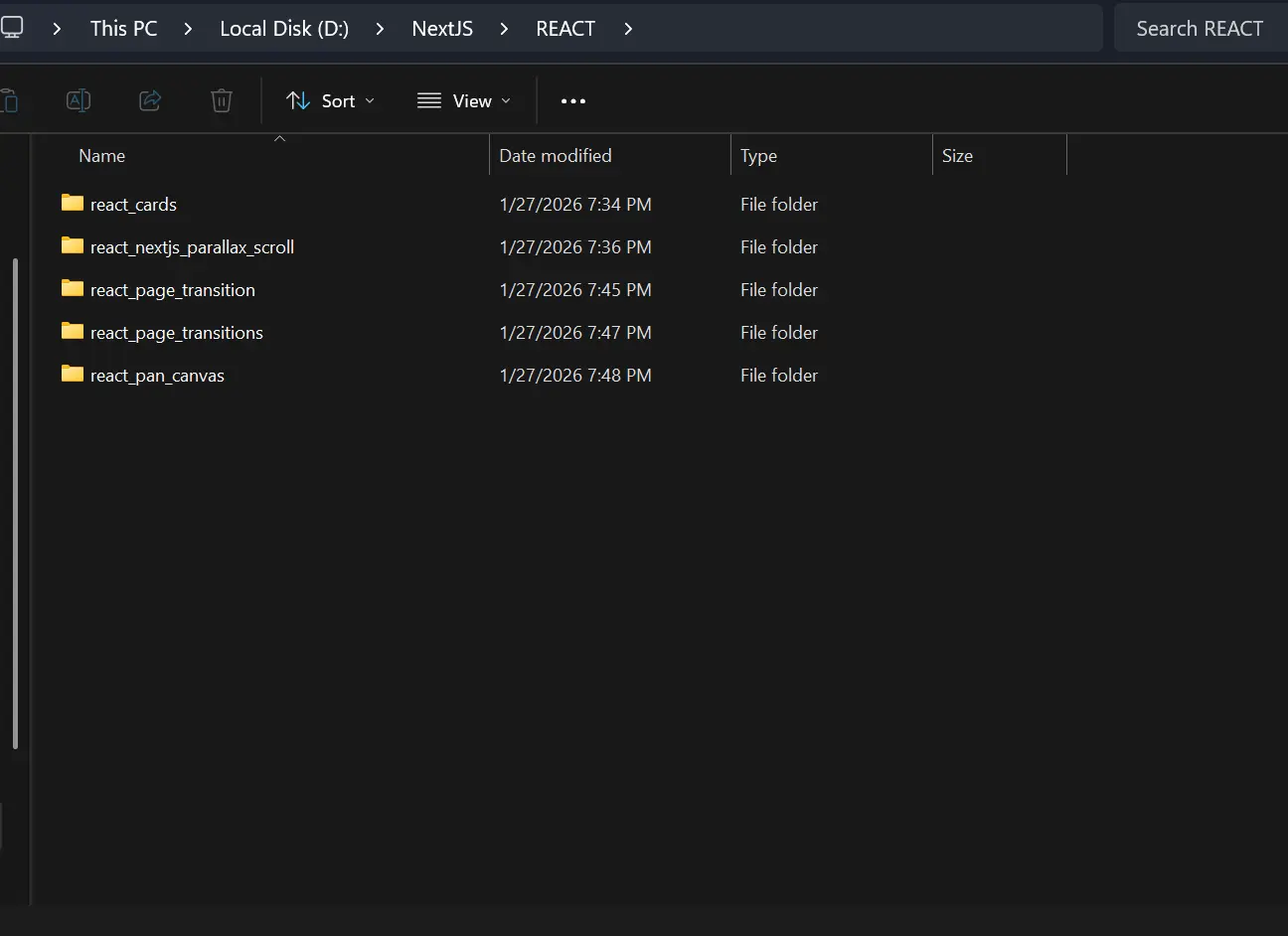
I compressed REACT folder (made a .zip file) and got REACT.zip in the same directory "D:\NextJS\REACT.zip"
Then I opened new terminal in VSCode in folder cleaning_node_files and write this command:
python clean_node_modules.py "D:\NextJS\REACT.zip"
It creates REACT_cleaned.zip in the same directory "D:\NextJS\REACT_cleaned.zip"
and you will get this:
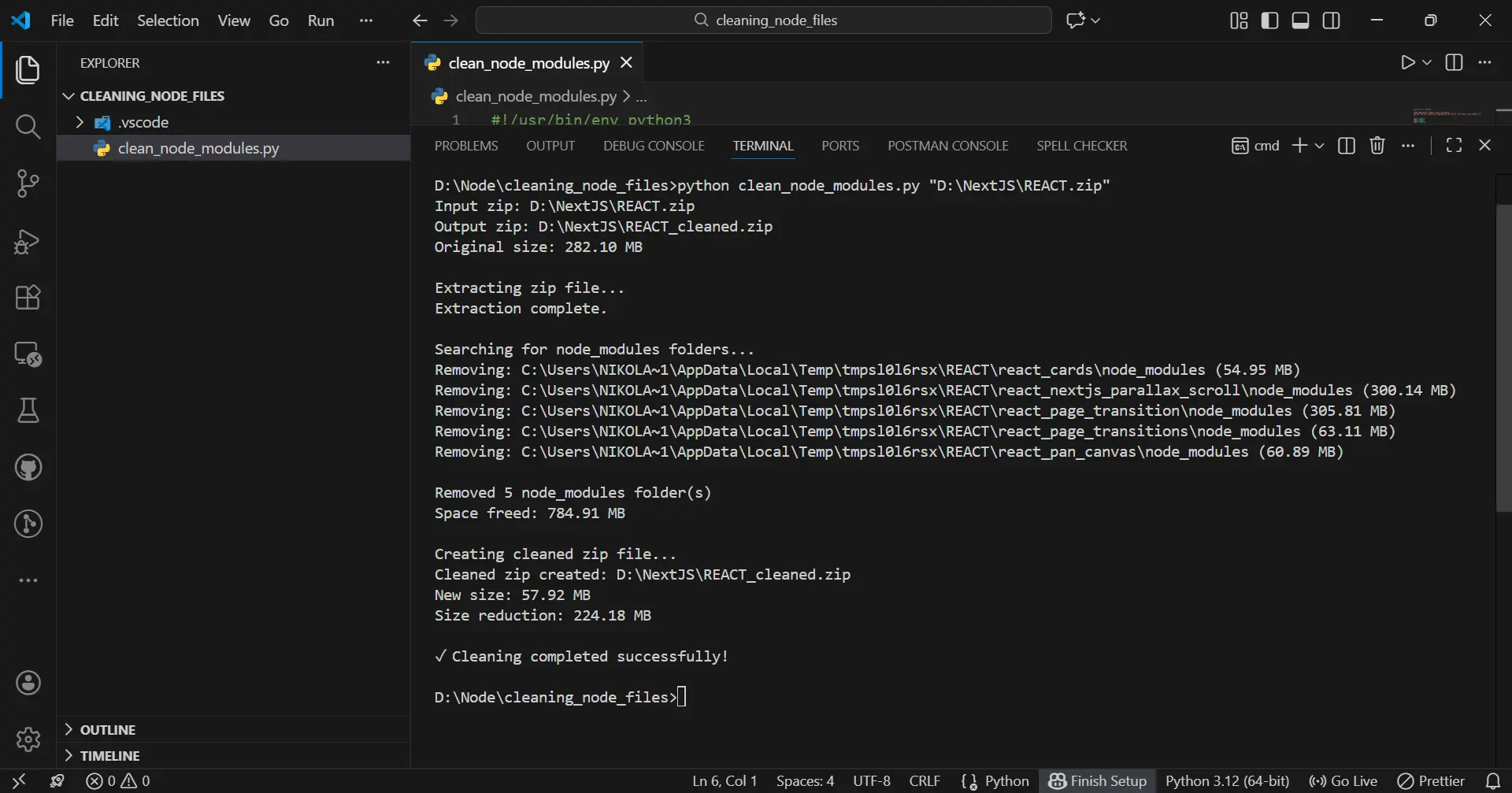
Tip You will get PATH of folder you want to clean (in my case
"D:\NextJS\REACT.zip") by right click and pressCopy as path
So, in the end what we did:
-
size of the
REACTfolder withnode moduleswas: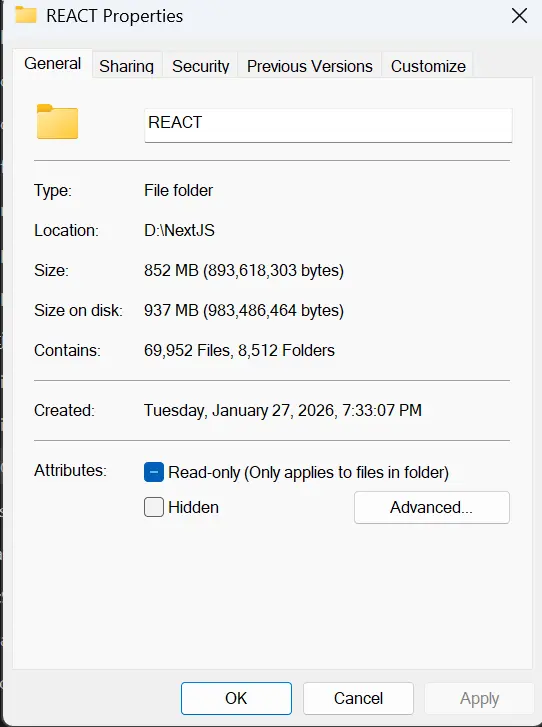
-
size of the
REACT zipfolder withnode moduleswas: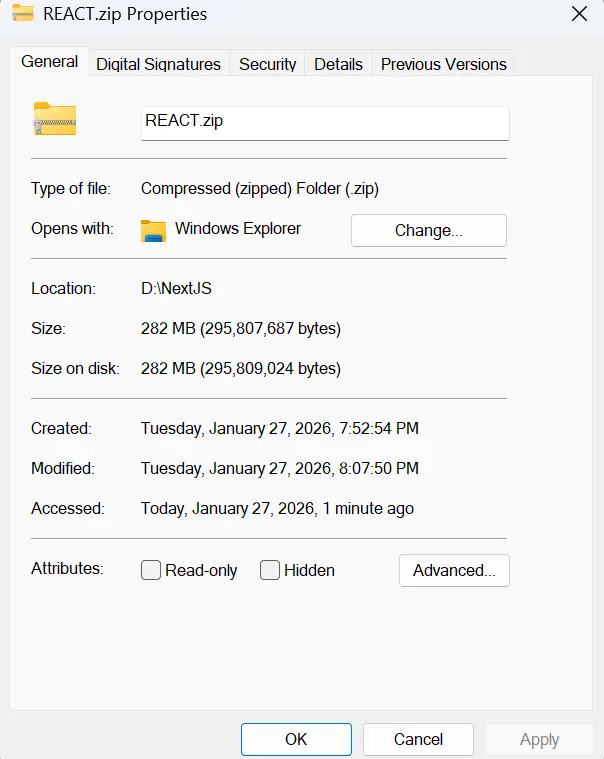
-
size of the
REACT zipfolder withoutnode modulesis: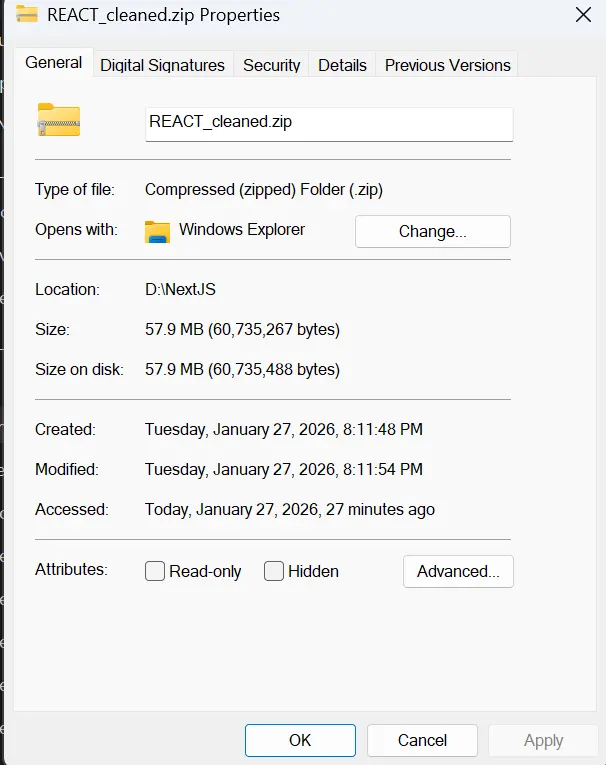
-
size of the unpacked
REACTfolder withoutnode modulesis: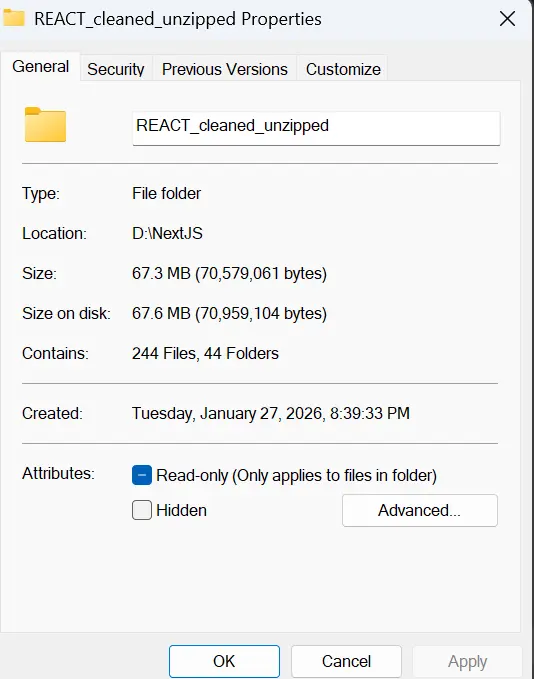
We clean impressive 937 - 67.6 = 869.4 MB!!!
Script 2: Clean Directories
Perfect for cleaning already-extracted project folders.
So, this is even easier way to clean your folders from node modules
In the same folder cleaning_node_files create the new script clean_directory.py and paste code given below.
The Script
#!/usr/bin/env python3
"""
Clean node_modules folders from a directory.
Useful if you've already extracted your zip and just want to clean it.
"""
import shutil
from pathlib import Path
import argparse

def get_folder_size(folder_path):
    """Calculate total size of a folder in bytes."""
    total_size = 0
    try:
        for item in folder_path.rglob('*'):
            if item.is_file():
                total_size += item.stat().st_size
    except (PermissionError, OSError):
        pass
    return total_size

def clean_directory(directory_path, dry_run=False):
    """
    Remove all node_modules folders from a directory.

    Args:
        directory_path: Root directory to clean
        dry_run: If True, only show what would be deleted without actually deleting
    """
    directory = Path(directory_path)

    if not directory.exists():
        raise FileNotFoundError(f"Directory not found: {directory_path}")

    print(f"Scanning directory: {directory_path}")
    print(f"Dry run mode: {dry_run}\n")

    node_modules_folders = []

    # Find all node_modules directories
    for node_modules_path in directory.rglob('node_modules'):
        if node_modules_path.is_dir():
            node_modules_folders.append(node_modules_path)

    if not node_modules_folders:
        print("No node_modules folders found.")
        return 0, 0

    print(f"Found {len(node_modules_folders)} node_modules folder(s):\n")

    total_size = 0
    removed_count = 0
    skipped_count = 0

    for folder_path in node_modules_folders:
        # Check if folder still exists (might have been deleted as part of parent)
        if not folder_path.exists():
            skipped_count += 1
            continue

        folder_size = get_folder_size(folder_path)
        total_size += folder_size

        relative_path = folder_path.relative_to(directory)
        size_mb = folder_size / (1024*1024)

        print(f"  {relative_path}")
        print(f"    Size: {size_mb:.2f} MB")

        if not dry_run:
            try:
                if folder_path.exists():  # Double-check before deletion
                    shutil.rmtree(folder_path)
                    print("    Status: ✓ Removed")
                    removed_count += 1
                else:
                    print("    Status: ⊘ Already removed (nested)")
                    skipped_count += 1
            except Exception as e:
                print(f"    Status: ✗ Error: {e}")
        else:
            print("    Status: Would be removed")
            removed_count += 1

        print()

    if skipped_count > 0 and not dry_run:
        print(f"Skipped {skipped_count} nested folder(s) (already removed with parent)\n")

    print(f"{'Would remove' if dry_run else 'Removed'} {removed_count} folder(s)")
    print(f"Total space {'that would be' if dry_run else ''} freed: {total_size / (1024*1024):.2f} MB")

    return removed_count, total_size

def main():
    parser = argparse.ArgumentParser(
        description='Clean node_modules folders from a directory',
        formatter_class=argparse.RawDescriptionHelpFormatter,
        epilog="""
Examples:
  %(prog)s /path/to/projects              # Clean all node_modules
  %(prog)s /path/to/projects --dry-run    # Preview what would be deleted
        """
    )

    parser.add_argument('directory', help='Path to the directory to clean')
    parser.add_argument('--dry-run', action='store_true',
                       help='Show what would be deleted without actually deleting')

    args = parser.parse_args()

    try:
        clean_directory(args.directory, args.dry_run)

        if not args.dry_run:
            print("\n✓ Cleaning completed successfully!")
        else:
            print("\n✓ Dry run completed. Use without --dry-run to actually delete.")
    except Exception as e:
        print(f"\n✗ Error: {e}")
        return 1

    return 0

if __name__ == "__main__":
    exit(main())
Usage Examples
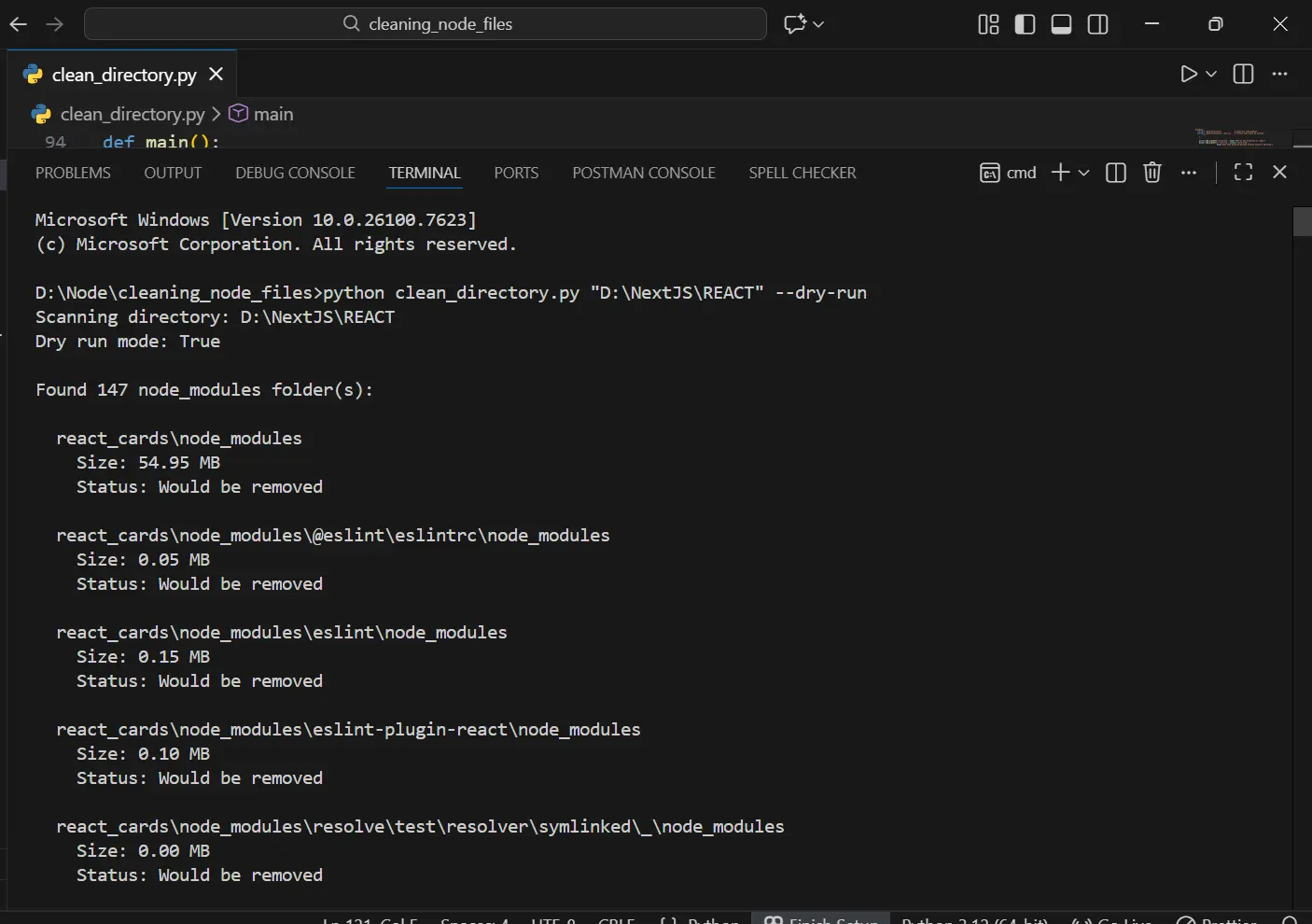
Safe preview — see what would be deleted
python clean_directory.py /path/to/projects --dry-run
in my specific case it will be:
python clean_directory.py "D:\NextJS\REACT" --dry-run
and you will get this:
Actually clean the directory
when after the above command you have checked the folders (node modules) that will be deleted, then the final deletion of those folders is approached by
python clean_directory.py /path/to/projects
in my specific case it will be:
python clean_directory.py "D:\NextJS\REACT"
Example output
D:\Node\cleaning_node_files>python clean_directory.py "D:\NextJS\REACT"
Scanning directory: D:\NextJS\REACT
Dry run mode: False

Found 147 node_modules folder(s):

  react_cards\node_modules
    Size: 54.95 MB
    Status: ✓ Removed

  react_nextjs_parallax_scroll\node_modules
    Size: 300.14 MB
    Status: ✓ Removed

  react_page_transition\node_modules
  react_page_transition\node_modules
  react_page_transition\node_modules
    Size: 305.81 MB
    Status: ✓ Removed


  react_page_transitions\node_modules
    Size: 63.11 MB
    Status: ✓ Removed
    Size: 63.11 MB
    Status: ✓ Removed

    Status: ✓ Removed

  react_pan_canvas\node_modules

  react_pan_canvas\node_modules
    Size: 60.89 MB
  react_pan_canvas\node_modules
    Size: 60.89 MB
    Size: 60.89 MB
    Status: ✓ Removed
    Status: ✓ Removed


Skipped 142 nested folder(s) (already removed with parent)

Removed 5 folder(s)
Total space  freed: 784.91 MB

✓ Cleaning completed successfully!

D:\Node\cleaning_node_files>
Real-World Use Cases
Note: Linux/Mac users should use
python3, Windows users should usepython
Use Case 1: Before Cloud Backup
Linux/Mac:
# Without cleaning
$ du -sh ~/Projects
8.5G    /Users/nikola/Projects

# Clean it
$ python3 clean_directory.py ~/Projects

# After cleaning
$ du -sh ~/Projects
1.2G    /Users/nikola/Projects
Windows (PowerShell):
# Without cleaning
PS> (Get-ChildItem C:\Projects -Recurse | Measure-Object -Property Length -Sum).Sum / 1GB
8.5

# Clean it
PS> python clean_directory.py C:\Projects

# After cleaning
PS> (Get-ChildItem C:\Projects -Recurse | Measure-Object -Property Length -Sum).Sum / 1GB
1.2
Upload time: 2 hours → 15 minutes ⚡
Use Case 2: Archiving Old Projects
Linux/Mac:
# Create archive
$ zip -r old_projects.zip ~/OldProjects

# Clean it
$ python3 clean_node_modules.py old_projects.zip

# Compare sizes
Old: 3.2GB
New: 280MB (91% smaller!)
Windows (PowerShell):
# Create archive
PS> Compress-Archive -Path C:\OldProjects -DestinationPath old_projects.zip

# Clean it
PS> python clean_node_modules.py old_projects.zip

# Compare sizes
Old: 3.2GB
New: 280MB (91% smaller!)
Use Case 3: Before Transferring to External Drive
Linux/Mac:
# Clean before copying
$ python3 clean_directory.py ~/Projects --dry-run
# Review what will be deleted

$ python3 clean_directory.py ~/Projects
# Copy to external drive (much faster!)
Windows (PowerShell):
# Clean before copying
PS> python clean_directory.py C:\Projects --dry-run
# Review what will be deleted

PS> python clean_directory.py C:\Projects
# Copy to external drive (much faster!)
Use Case 4: Disk Space Emergency
Linux/Mac:
# Your disk is full!
$ df -h
Filesystem      Size   Used  Avail Capacity
/dev/disk1     500G   495G    5G    99%

# Clean development folder
$ python3 clean_directory.py ~/Projects

# Check again
$ df -h
Filesystem      Size   Used  Avail Capacity
/dev/disk1     500G   488G   12G    98%
Windows (PowerShell):
# Your disk is full!
PS> Get-PSDrive C | Select-Object Used,Free

Used          Free
----          ----
531914924032  5368709120

# Clean development folder
PS> python clean_directory.py C:\Projects

# Check again
PS> Get-PSDrive C | Select-Object Used,Free

Used          Free
----          ----
524288000000  12884901888
Freed 7GB in 30 seconds 🚀
Performance Comparison
| Task | Web App | Local Script |
|---|---|---|
| Upload 500MB zip | 5 minutes | N/A (already local) |
| Processing | Queued (2-10 min wait) | Instant start |
| Download cleaned file | 2 minutes | N/A (already local) |
| Total time | ~12 minutes | ~30 seconds |
| Security risks | Multiple | Zero |
| File size limit | 50MB typical | Unlimited |
| Privacy | Code on remote server | Never leaves your machine |
Tips & Best Practices
For Developers
- Always use
--dry-runfirst to verify what will be deleted - Keep the original until you confirm the cleaned version works
- Add to your workflow — clean before every backup
- Create an alias for quick access:
Linux/Mac (add to ~/.bashrc or ~/.zshrc):
alias clean-node='python3 ~/scripts/clean_directory.py'

# Usage
clean-node ~/Projects --dry-run
Windows (add to PowerShell profile):
# First, find your profile location
PS> $PROFILE

# Create/edit it and add:
function Clean-Node {
    python C:\scripts\clean_directory.py $args
}

# Usage
Clean-Node C:\Projects --dry-run
- Integrate with backup scripts:
Linux/Mac (backup.sh):
#!/bin/bash
# backup.sh

# Clean before backing up
python3 clean_directory.py ~/Projects

# Then backup
tar -czf projects_backup.tar.gz ~/Projects
Windows (backup.ps1):
# backup.ps1

# Clean before backing up
python clean_directory.py C:\Projects

# Then backup
Compress-Archive -Path C:\Projects -DestinationPath projects_backup.zip
Safety Checklist
- ✅ Your source code and
package.jsonremain intact - ✅ You can regenerate
node_modulesanytime withnpm install - ✅ No hidden files or configs are deleted
- ✅ Only folders named exactly "node_modules" are removed
- ✅ The script never modifies files, only removes folders
What Gets Removed vs. What Stays
Removed:
- ✅ All
node_modulesfolders (any depth) - ✅ All dependencies inside them
Preserved:
- ✅ Your source code (
.js,.jsx,.ts,.tsx) - ✅ Configuration files (
package.json,tsconfig.json, etc.) - ✅ Environment files (
.env,.env.local) - ✅ Build output (
dist,buildfolders) - ✅ Everything else
Troubleshooting
"Permission denied" error
Problem: Can't delete some folders
Linux/Mac Solutions:
# Use sudo (be careful!)
sudo python3 clean_directory.py ~/Projects

# Or fix permissions first
chmod -R u+w ~/Projects
Windows Solutions:
# Run PowerShell as Administrator
# Right-click PowerShell → "Run as Administrator"
PS> python clean_directory.py C:\Projects

# Or take ownership of the folder
PS> takeown /F C:\Projects /R /D Y
PS> icacls C:\Projects /grant %username%:F /T
"File not found" error
Problem: Path doesn't exist
Linux/Mac Solutions:
# Use absolute path
python3 clean_directory.py /Users/nikola/Projects

# Or use quotes for paths with spaces
python3 clean_directory.py "/Users/nikola/My Projects"
Windows Solutions:
# Use absolute path
python clean_directory.py C:\Users\nikola\Projects

# Or use quotes for paths with spaces
python clean_directory.py "C:\Users\nikola\My Projects"
Script runs but nothing deleted
Possible causes:
- No
node_modulesfolders exist in that directory - Case sensitivity (Linux/Mac) — must be exactly "node_modules"
- The folders are symlinks (not actual directories)
Verify - Linux/Mac:
# Find all node_modules folders manually
find ~/Projects -name "node_modules" -type d
Verify - Windows (PowerShell):
# Find all node_modules folders manually
Get-ChildItem -Path C:\Projects -Filter "node_modules" -Recurse -Directory
Very slow processing
Cause: Large number of files
Solution: This is normal! Processing 500,000 files takes time. The script shows progress for each folder.
❓ FAQ
Q: Will this delete my source code?
No! Only folders named exactly node_modules are removed. Your source code, package.json, and all other files remain intact.
Q: Can I recover node_modules after deletion?
Yes! Simply run:
npm install
# or
yarn install
Q: What about nested node_modules?
The script intelligently handles nested node_modules folders. When a parent folder is deleted, nested ones are skipped to avoid errors.
Q: Is it safe to use?
Yes! The scripts:
- Show exactly what will be deleted
- Offer a
--dry-runmode for previewing - Don't modify files, only remove
node_modulesfolders - Handle errors gracefully
Q: Why not just use find or rm (Linux/Mac) or manual deletion (Windows)?
These scripts provide:
- ✅ Cross-platform compatibility (Windows, Linux, macOS)
- ✅ Space calculation before and after
- ✅ Progress reporting
- ✅ Safe handling of special characters in paths
- ✅ ZIP archive support
- ✅ Dry run mode
Q: What's the typical space savings?
| Project Type | Typical Size | Savings |
|---|---|---|
| Small (CRA) | 150-200 MB | ~180 MB |
| Medium (Next.js) | 300-400 MB | ~350 MB |
| Large (Nx monorepo) | 800-1200 MB | ~1000 MB |
| Enterprise | 1500+ MB | ~1500 MB |
For 10 projects: 3-5 GB freed! 💾
Why This Approach Wins
The Local-First Philosophy
Instead of adding complexity:
- ❌ Authentication systems
- ❌ Rate limiting
- ❌ Job queues
- ❌ File upload handling
- ❌ Security hardening
- ❌ Server monitoring
- ❌ Database for tracking
- ❌ CDN for downloads
We get:
- ✅ A simple Python script
- ✅ Zero infrastructure
- ✅ Complete privacy
- ✅ Unlimited file sizes
- ✅ Instant processing
- ✅ Zero security attack surface
When Local Beats Cloud
Local-first is better when:
- Processing doesn't require server-side resources
- Privacy matters
- File sizes are large
- Processing is one-time or infrequent
- Security complexity outweighs convenience
Web services are better when:
- Collaboration is needed
- Access from any device is required
- Persistent storage is necessary
- Complex orchestration is involved
For cleaning node_modules? Local wins every time.
License
MIT License — Free to use for any purpose. No attribution required.
Final Thoughts
Sometimes the best solution is the simplest one. Instead of building a complex web service with authentication, security hardening, and infrastructure costs, a local script gives you:
- More power — No file size limits
- More control — See exactly what's happening
- More privacy — Your code never leaves your machine
- More speed — No network latency
- Zero costs — No servers to maintain
Save your node_modules cleaning for your local machine. It's faster, safer, and more efficient.
Start reclaiming your disk space today! 🚀
Credits
Built with ❤️ by ponITech